

Table of Content
- Introduction: Why Choosing the Right Industrial Display Really Matters
- Understanding What Makes a Display ‘Industrial’
- Why Not Use a Regular Display in a Factory Setup?
- Common Types of Industrial Display Monitors
- How to Choose Industrial Display That Fits Your Setup
- Why Touchscreen Industrial Displays Are Gaining Popularity
- Benefits of Using the Best Industrial Display for Factories
- Top Features to Look for in an Industrial Display Monitor
- Why Global Infotech Solutions is a Trusted Partner for Industrial Displays
- Common Mistakes to Avoid When Buying Industrial Displays
- Frequently Asked Questions
- Conclusion
Introduction: Why Choosing the Right Industrial Display Really Matters
When you’re setting up equipment on a factory floor or upgrading your automation system, the screen you use is just as important as the machines it connects to. A regular office monitor may seem like a quick fix, but it won’t survive the demands of industrial environments. That’s where an Industrial Display makes all the difference.
Built for tough conditions like heat, dust, vibration, and continuous operation industrial displays are made to last. But with so many types, sizes, and features available, how do you pick the one that fits your setup best? This guide breaks it all down, in plain language.
Understanding What Makes a Display ‘Industrial’
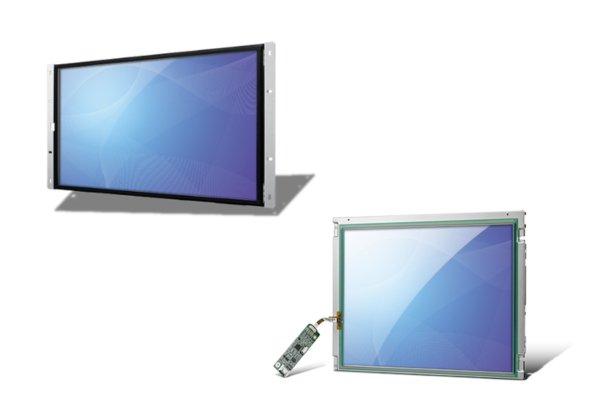
An industrial display monitor is built for demanding environments factories, production lines, outdoor sites, and automation rooms. These are not your regular home or office screens.
Key Characteristics:
- Designed for rugged use
- Can operate in extreme temperatures
- Built to handle dust, humidity, and vibration
- Long lifespan and 24/7 usage
- Often come with touchscreen functionality
Unlike commercial monitors, they are not flashy but they are reliable and tough, exactly what’s needed in industrial environments.
Why Not Use a Regular Display in a Factory Setup?
You might wonder: can’t we just use a regular monitor? Technically, yes. But it won’t last long.
Here’s why:
- Temperature: Industrial environments can get too hot or cold for regular screens
- Dust and moisture: They clog vents, cause screen fading or failure
- Continuous operation: Office monitors aren’t designed to stay on 24/7
- Touch support: Most consumer monitors lack rugged touchscreen technology
- Mounting needs: Industrial setups need VESA or panel mount options
So, investing in an industrial display monitor saves both time and maintenance cost in the long run.
Common Types of Industrial Display Monitors
There are various display types depending on how they are built, how they work, and where they’re used. Understanding the types of industrial display monitors helps you choose the right one.
1. Panel Mount Monitors
- Installed into a flat panel or cabinet
- Great for HMIs and control rooms
- Offers clean and safe integration
2. Rack Mount Monitors
- Designed for 19-inch rack systems
- Often used in network control centers
3. Open Frame Monitors
- No enclosure used inside kiosks or custom housings
- Custom-fit for embedded applications
4. Touchscreen Industrial Displays
- Resistive or capacitive touch
- Supports gloves and wet environments
- Perfect for production floors and shop floors
5. Sunlight Readable Monitors
- High brightness screens (1000+ nits)
- Ideal for outdoor use or bright factory lighting
6. Waterproof / IP65 Monitors
- Sealed against water, oil, and dust
- Useful in food production, chemical plants, or wet zones
7. Fanless Monitors
- Passive cooling system—no moving parts
- Suitable for dusty or vibration-heavy environments
Each type serves a different use case. If you’re not sure what your plant needs, consult with an industrial display manufacturer in India like Global Infotech Solutions for expert guidance.
How to Choose Industrial Display That Fits Your Setup
Choosing the right screen is not just about size or price. It’s about how well it fits your environment.
Here’s a simplified checklist:
1. Environment Conditions
- Is the area dusty, wet, or exposed to chemicals?
- Do you need IP-rated protection?
2. Usage Duration
- Will the display run continuously?
- Pick a screen with 24/7 operation support
3. Touchscreen Needs
- Will operators use gloves?
- Opt for touchscreen industrial displays India with resistive or capacitive options
4. Mounting Type
- Do you need wall-mount, panel mount, or VESA mount?
5. Size and Resolution
- Depends on viewing distance and interface details
- Typical range: 10” to 24” for machines
6. Power Supply
- Confirm voltage compatibility—many industrial displays support wide voltage inputs
7. Connectivity Options
- Does it support VGA, HDMI, DisplayPort, USB, Serial?
8. Build Quality
- Metal casing is better than plastic for durability
- Fanless is better for dusty zones
Why Touchscreen Industrial Displays Are Gaining Popularity
Modern factories are going digital. Touchscreen industrial displays are replacing buttons, switches, and keyboards.
Why industries prefer touchscreen displays:
- Easy to use: Tap to control
- Space-saving: No need for keyboard/mouse
- Faster operation: Shorter reaction time
- Better for HMIs: Interactive screens for live data
Types of Touch Technology:
- Resistive Touch: Works with gloves and styluses
- Capacitive Touch: Faster and more responsive
Touchscreens are especially useful in automation systems, SCADA setups, and production line monitoring.
Benefits of Using the Best Industrial Display for Factories
A well-chosen display improves efficiency, safety, and maintenance in your factory.
Benefits include:
- Improved visibility even in harsh lighting
- Reduced system downtime
- Better control of processes via HMI
- Enhanced durability in rugged settings
- Less maintenance cost over time
- Longer product lifecycle
All this translates into smooth operations and fewer disruptions.
Top Features to Look for in an Industrial Display Monitor
Every factory is different, but these features are valuable in most settings:
Must-Have Features:
- High brightness (for clear viewing)
- Fanless operation (silent + dust-proof)
- Wide temperature range (-10°C to 60°C or more)
- IP65 or higher rating (if exposure to liquids)
- VESA/Panel mounting
- Anti-glare screen
- Long availability and support
Working with a trusted industrial display manufacturer in India ensures access to these features.
Why Global Infotech Solutions is a Trusted Partner for Industrial Displays
Finding a reliable supplier is just as important as picking the right screen. That’s where Global Infotech Solutions comes in.
We offer:
- A wide range of touchscreen industrial displays India
- Custom-built solutions for factories and automation
- Durable designs tested in real industrial conditions
- Support for integration, installation, and after-sales service
Whether you’re upgrading your entire control system or just need a rugged display, our team makes it easy to get exactly what fits your needs.
Common Mistakes to Avoid When Buying Industrial Displays
Avoid these mistakes to save cost and time:
- Buying a screen that’s not rated for dust/moisture
- Choosing the wrong touchscreen type
- Not checking power and port compatibility
- Using commercial screens for rugged environments
- Ignoring mounting needs
- Choosing a screen with no local support or service
Getting the right industrial display monitor the first time means fewer replacements, better uptime, and more efficiency.
Frequently Asked Questions
Q1. What is the difference between an industrial and regular monitor?
Answer: Industrial monitors are built for tough use. They resist temperature, dust, and shock. Regular monitors are meant for offices and are not built to last in rough environments.
Q2. Can I use a touchscreen industrial display with gloves?
Answer: Yes, especially if it’s a resistive touchscreen. Capacitive touchscreens may work with special gloves.
Q3. How long do industrial display monitors last?
Answer: A good display lasts 5–10 years, depending on usage and environment. Most are designed for continuous operation.
Q4. What size industrial display is ideal for factories?
Answer: That depends on where it’s installed. For machine-mounted use, 10–15 inches is common. For control rooms, 19–24 inches is ideal.
Q5. Where can I get reliable industrial display solutions in India?
Answer: You can check with Global Infotech Solutions. They provide rugged and reliable industrial display solutions with local support and wide compatibility.
Conclusion
Selecting the right industrial display isn’t just about tech specs. It’s about matching the display to your environment, needs, and operation cycle. A good display helps your team work faster, reduces errors, and lasts for years with minimal maintenance.
Whether you’re looking for a touchscreen display, a waterproof monitor, or something customised, investing in a display that suits your setup is worth every rupee.
For expert help or to request a quote, contact the team at Global Infotech Solutions your trusted industrial display manufacturer in India.