

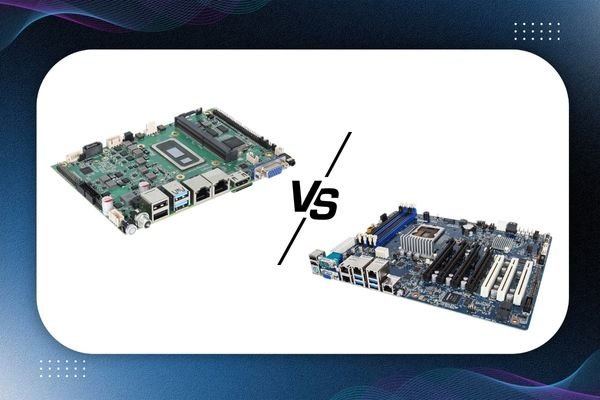
An SBC (Single Board Computer) motherboard is a compact, all-in-one computing solution with CPU, RAM, storage, and ports integrated on a single circuit board. A traditional motherboard, however, needs separate components (like processor, RAM, etc.) to work. SBCs are ideal for IoT, automation, robotics, and embedded systems, while traditional motherboards are more suitable for desktops and high-performance computing.
Why the Comparison Matters
Choosing the right motherboard can define how efficient your device becomes especially in industries like IoT, automation, and embedded systems. If you’re stuck between an SBC motherboard vs. traditional motherboard, you’re not alone.
More businesses are switching to compact and efficient setups, and that’s where SBCs enter the scene.
Whether you’re building smart home tech or managing a production line with automated systems, this comparison will guide you in picking what suits your goal.
What SBC Actually Means
Before we go deeper, let’s decode a quick abbreviation:
- SBC board full form: Single Board Computer
It’s exactly what it sounds like an entire computer on one single board. Everything is built-in: processor, memory, input/output ports, and storage.
There’s no need to add separate RAM, CPU, or storage drives unlike traditional motherboards that rely on these add-ons to become usable.
Traditional Motherboard Basics
A traditional motherboard is the heart of a typical computer system like the one inside your desktop PC. But it doesn’t work alone. You have to install separate parts:
- CPU
- RAM
- GPU (optional)
- SSD/HDD
- Power supply
These boards are larger in size and built for performance-heavy tasks like gaming, video editing, and software development.
SBC Motherboard vs. Traditional Motherboard: 8 Key Differences
Let’s compare them across the most important aspects that affect real-world usage.
| Feature | SBC Motherboard | Traditional Motherboard |
| Size | Very compact (credit card to small tablet size) | Much larger |
| Component Integration | All-in-one (CPU, RAM, storage included) | Requires separate CPU, RAM, storage |
| Power Usage | Extremely low | High |
| Performance | Moderate (enough for IoT, media, automation) | High performance for demanding tasks |
| Upgradability | Limited | Highly upgradeable |
| Cooling | Passive or small heatsinks | Needs fans or liquid cooling |
| Price Range | Budget-friendly | Cost depends on configuration |
| Use Cases | IoT, robotics, automation, kiosks | Desktops, servers, gaming, workstations |
Why Choose SBC over Traditional Motherboard for IoT and Automation
For IoT and industrial automation, size, energy efficiency, and stability matter more than raw power.
Here’s why SBC motherboards are often the better fit:
- Compact footprint: Fits in tight enclosures like vending machines, ATMs, or factory controls
- Energy-efficient: Works well even on battery-powered systems
- Built-in interfaces: USB, GPIO, HDMI, Wi-Fi all built in
- Silent operation: No noisy fans or spinning drives
If you’re building smart kiosks, home automation products, or sensor-based setups, SBC is ideal.
Single Board Computer Advantages
SBCs may not match the performance of high-end gaming rigs, but they pack a lot of benefits for specific use cases:
Benefits of SBC Motherboards:
- Easy to set up and deploy
- Requires less space and fewer parts
- Lower power bills
- Suitable for remote and unmanned systems
- Versatile for educational and prototype builds
- Fanless designs reduce moving parts and failure points
Types of SBC Motherboards You Should Know
There isn’t a one-size-fits-all SBC. Depending on your project, you can choose from different types:
1. Industrial SBCs
- Built for tough environments
- Used in factories, vehicles, and harsh conditions
2. Consumer SBCs
- Affordable, small SBCs like Raspberry Pi
- Used in DIY projects and prototypes
3. Performance SBCs
- High-end SBCs with advanced CPUs and GPU support
- Ideal for AI, edge computing, and media servers
Choosing the right one depends on how much processing you need and what your use case is.
SBC vs Motherboard for IoT Devices
IoT applications prioritize reliability and power efficiency over flashy performance. In that sense, SBCs check all the boxes.
Where SBCs Outperform:
- Smart energy meters
- Wearable health trackers
- Home automation hubs
- Security monitoring systems
- Retail kiosks
You wouldn’t use a full-blown PC motherboard for these tasks it’s bulky, overpowered, and wastes energy.
Differences in Performance: SBC vs Motherboard
Let’s be honest SBCs can’t match the raw performance of a traditional desktop motherboard. But that’s not a drawback it’s intentional.
SBCs are designed for:
- Light to moderate computing tasks
- Continuous, stable operation
- Minimal maintenance
- Long lifespan
Traditional motherboards are better for:
- 3D rendering
- Complex software development
- Gaming
- Large-scale databases
So it depends entirely on what you’re building.
Embedded Systems Motherboard Use Cases
SBCs often act as the embedded systems motherboard in:
- Smart appliances (TVs, fridges)
- POS systems
- Automated checkout kiosks
- Surveillance setups
- Factory machines
- Medical devices
These machines don’t need to run heavy software they need reliability and uptime.
When to Use SBC vs Traditional Motherboard
Here’s a quick decision-maker based on use case:
Choose SBC If You Want:
- A compact solution for a single purpose
- Less heat, less noise
- Quick prototyping or educational use
- Budget control
Choose Traditional Motherboard If You Need:
- High computing power
- Gaming or video editing
- Multiple upgrade paths
- Advanced multitasking
How Global Infotech Solutions Helps You Choose Right
At Global Infotech Solutions, we don’t just provide hardware we help you make smarter decisions.
Whether you need SBCs for automation or traditional motherboards for full-scale deployments, we guide you at every step.
We help you pick:
- The right SBC for your IoT project
- The most efficient motherboard for your industrial use
- Embedded system support that fits your automation needs
FAQs
Q1. What is the main difference between SBC and motherboard?
Answer: An SBC has everything (CPU, RAM, storage) on one board. A traditional motherboard needs external parts like RAM and CPU to function.
Q2. Is SBC better than traditional motherboard?
Answer: It depends on your need. For IoT, automation, and embedded systems, SBC is better. For performance-heavy tasks, traditional motherboards work best.
Q3. SBC vs motherboard for IoT devices which is ideal?
Answer: SBC is ideal for IoT devices due to its low power use, small size, and all-in-one setup.
Q4. Are SBC motherboards upgradable?
Answer: Generally no. Most SBCs come with fixed components. If you need upgrades, go for traditional boards.
Q5. What are some single board computer advantages?
Answer: They’re compact, power-efficient, silent, and perfect for dedicated tasks like automation, robotics, and kiosks.
Conclusion
SBC motherboards and traditional motherboards both serve different purposes. If your goal is to run powerful software, handle multitasking, or build custom gaming setups, traditional motherboards are the way to go.
But for embedded projects, smart devices, automation systems, and compact builds SBCs win in terms of simplicity, power savings, and cost-effectiveness.
If you’re unsure which one fits your setup, reach out to Global Infotech Solutions. We’re here to guide you whether you’re building a smart factory, an IoT solution, or a performance system.